

If you run a business Page on Facebook, you may have noticed something new: Facebook now limits how many posts with links you can publish each month. After that, you have to pay.
This is not a rumor. Here is what changed, what it costs, and what you can do about it without opening your wallet.
What changed
In September 2026, Meta launched a subscription called Meta One. As part of the rollout, business Pages and professional profiles are limited to 2 posts with external links per month on the free plan.
Go over that number and your link simply stops working as a link. It shows up as plain text. No preview image, no tap to visit. Your followers see a URL they cannot click.
A few details worth knowing:
- Links in comments count toward the same limit, so the old first comment trick does not get around it.
- Links in your bio do not count.
- Links to Meta’s own platforms, like Instagram and WhatsApp, do not count.
- The rollout is happening in waves, so your Page may not be affected yet. It is coming.

What Meta charges
- Free: 2 link posts per month
- Essential, $14.99/month: still 2. This tier adds a verified badge and impersonation protection, but zero extra links.
- Advanced, $49.99/month: 8 link posts
- Expert, $149.99/month: 20 link posts
- Max, $499.99/month: unlimited
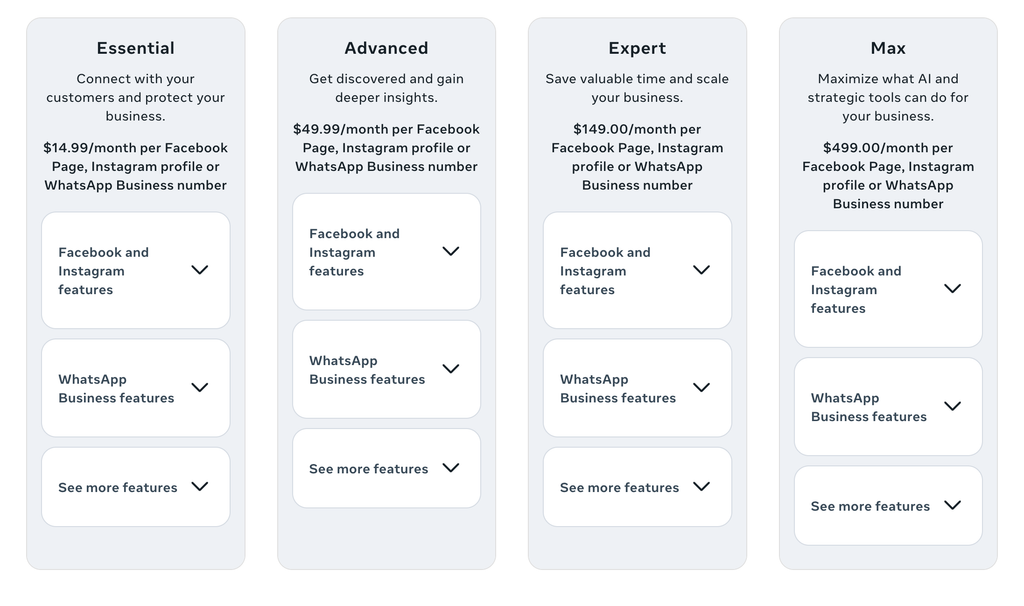
Read that Essential line again. Fifteen dollars a month and you get the same 2 links as free. For most small businesses, none of these plans make financial sense.
Why Meta is doing this
Meta makes money when people stay on Facebook and Instagram scrolling past ads. Every click to your website ends that visit. Meta’s own reports show that only about 1 percent of widely viewed content on Facebook now contains an external link, down from nearly 10 percent in 2022. Link posts were already losing reach for years. Now Meta has put a price tag on what is left.

What you can do instead
You do not need to pay. You need to change tactics. Here are the moves that work.
- Post native video instead of link posts. A Reel or native video with “link in bio” does not use any of your link allowance, and Facebook and Instagram already push video harder than link posts. Show the product, tell the story, point to the bio.
- Make your bio link work harder. Your bio link is quota free. Point it at the page that matters most right now: a current offer, an event, a booking page. Change it when your priority changes. Every post can say “link in bio.”
- Spend your 2 free links like money. You still get 2 every month. Save them for the posts that directly make you money: a big sale, a launch, a registration deadline. Everything else goes out as a Reel, a Story, or a plain post.
- Use Story link stickers. Stories with link stickers are not part of the limit. They disappear in 24 hours, so use them for timely things: today only offers, event reminders, new arrivals.
- Pin one link post. If there is one page people always need, your booking page or your menu, publish it as one of your link posts and pin it to the top of your Page. It keeps working without spending more of your allowance.
- Build your email list. This is the real lesson. Every algorithm change teaches the same thing: you do not own your Facebook followers. An email list is yours. Nobody can charge you per link or throttle your reach. A simple signup form on your website turns followers into subscribers you can reach any time, for free.
- Post where links are still free. Your Google Business Profile lets you publish posts with links at no cost, and it shows up when nearby customers search for what you do. Your website’s blog is fully yours. These owned channels never had a link tax and never will.
- Put the details in the image. For local businesses, a well designed graphic with a QR code can carry the link without using a link post at all. People point their camera and they are on your site.
The bottom line
Meta turned links into a paid feature because links were already worth less on their platforms than they used to be. The businesses that come out ahead are the ones that stop renting their audience and start owning it: a website that ranks, an email list that opens, and social posts that earn attention instead of begging for clicks.
If you want help with any of that, that is what I do. I build websites for small businesses, set up email lists, and make the social content that points to both. Get in touch and we will talk about what makes sense for yours.